Tonkeeper Wallet Is Now Keeper: What Changed and What Didn't
Tonkeeper wallet is now called Keeper (formerly Tonkeeper): the same self-custodial app under a new name, now on seven networks, and your TON wallet, recovery phrase and funds stay exactly as they were. Just update the app you already have. Moving to a multichain wallet is optional, and your existing wallets keep their addresses.
Why Tonkeeper became Keeper
Tonkeeper became Keeper on 15 September 2026 because the wallet outgrew TON: users kept assets on other blockchains, so Ethereum, Bitcoin, BNB Chain, Arbitrum and Base joined TON and TRON, and the old name no longer fit. TON stays fully supported. If you know the wallet as Tonkeeper, or as тонкипер in Russian, it is the same wallet, and older Tonkeeper wallet reviews that describe a TON-only app are out of date.
What changed
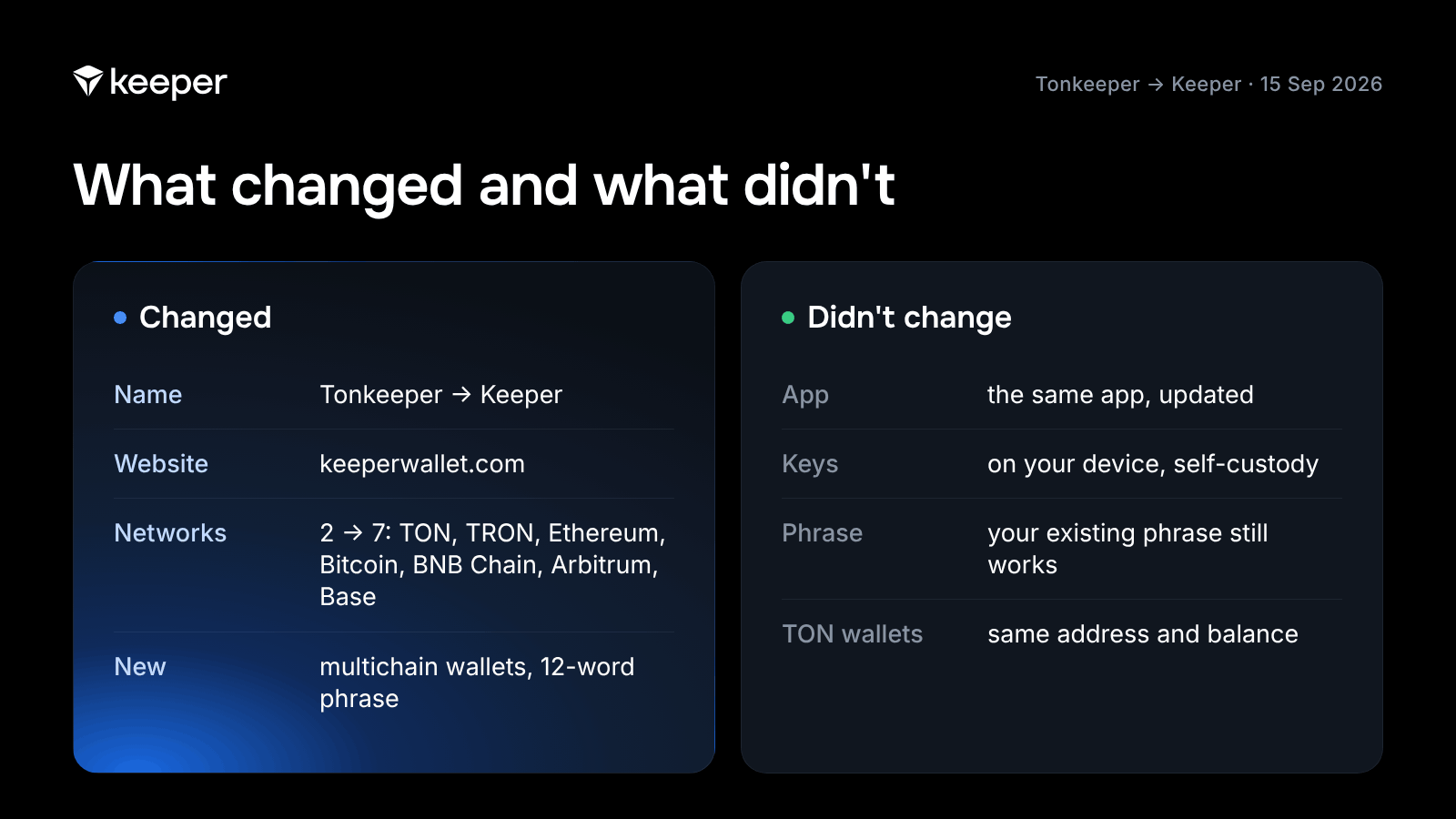
In the move from Tonkeeper to Keeper, four things changed: the name, the website, the networks and the wallet types.
| Tonkeeper (before) | Keeper (since 15 September 2026) | |
|---|---|---|
| App name | Tonkeeper | Keeper |
| Website | tonkeeper.com | keeperwallet.com (tonkeeper.com redirects there) |
| Networks | TON, TRON | TON, TRON, Ethereum, Bitcoin, BNB Chain, Arbitrum, Base |
| Wallet types | TON wallets | TON wallets and multichain wallets |
| Recovery phrase of a new wallet | 24 words (TON wallet) | 12 words (multichain wallet) |
Source: keeperwallet.com, Keeper help center and App Store listing, as of October 2026.
The biggest change is the multichain wallet. It holds assets on all seven networks under one 12-word recovery phrase, and swaps between networks happen inside the app, with no bridges and no second app. Create one with New Wallet, or import a wallet you already use in another app, such as Trust Wallet or MetaMask.
One more rename: in June 2026 the TON community voted to rename the network's coin from Toncoin to Gram (ticker GRAM). Balances, addresses and phrases stayed the same, with nothing to swap.
What didn't change
Your keys, your wallets and the app itself stayed the same after the rebrand. Keeper is still self-custodial: the keys stay on your device, you can create and use a wallet without an account, email or KYC, and the team has no access to your funds. The Tonkeeper app updates to Keeper in the App Store and Google Play with your wallets and balances untouched. The Tonkeeper wallet features you used on TON, from tokens and NFTs to dApps and staking, are still there. The web wallet and the Tonkeeper extension for Chrome are on the download page.
Do you need to migrate your wallet?
No, you don't need to migrate: moving to a Keeper multichain wallet is optional, and your TON wallet keeps working as it is. Migrate only if you want your TON and TRON assets next to Bitcoin, Ethereum and the other networks.
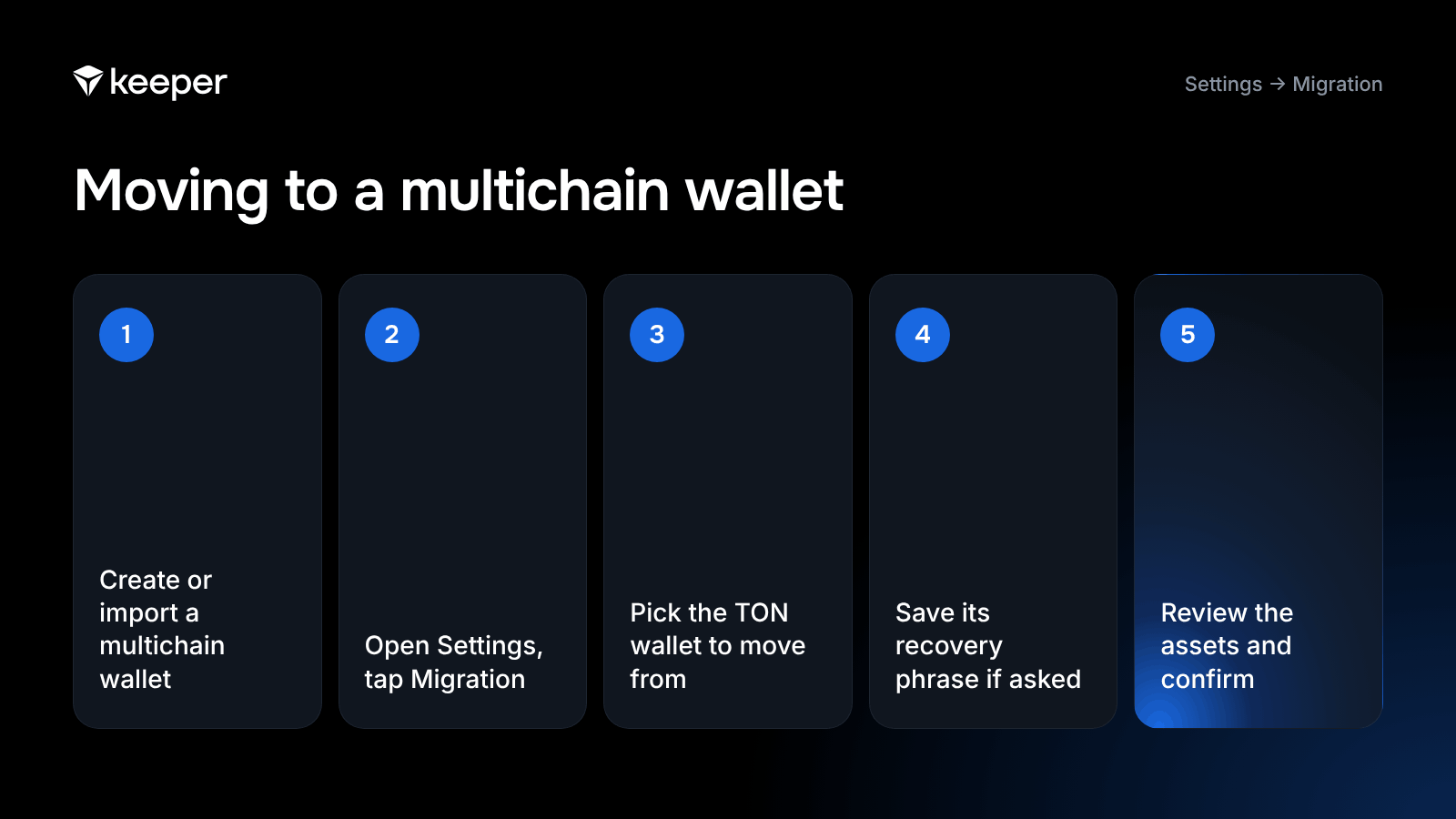
A TON wallet with a 24-word phrase can't be turned into a multichain wallet, because the two use different derivation paths (the rules that turn a phrase into keys and addresses). Is the Tonkeeper mnemonic BIP39? Only the word list: the 24-word TON phrase takes its words from the BIP39 list but turns them into keys TON's own way. Keeper moves the assets for you instead:
- Update or install Keeper, then create a new multichain wallet or import an existing one.
- Go to Settings and tap Migration.
- Pick the TON wallet you want to move assets from.
- If you haven't saved that wallet's recovery phrase yet, save it and pass the check.
- Review the list of assets and confirm.
Assets move automatically within a couple of minutes, with no need to send each token by hand.
Watch the short video on Keeper's official Telegram channel: How to migrate to your new multichain wallet.
Migration moves your TON tokens and NFTs and your TRON USDT (TRC20) and TRX. The app shows the network fee before you confirm.
After you migrate, share your new addresses: your multichain wallet's addresses, including on TON, differ from your TON wallet's.
What happens to your Battery charges
Battery charges can't be moved to a multichain wallet. Battery is Keeper's prepaid balance for network fees, and its charges stay on your TON wallet, where you keep spending them as before. If you bought charges you no longer need, you can ask for a refund within 14 days of the purchase:
- Paid with crypto: open Settings → Battery → Charge History, pick the purchase and request the refund in Details.
- Paid through the App Store or Google Play: request the refund from Apple or Google, which handle in-app purchase refunds.
Is your recovery phrase still valid?
Yes, your Tonkeeper recovery phrase is still valid: every existing wallet keeps its phrase, and that phrase still restores the wallet in Keeper. A multichain wallet you create comes with its own 12-word phrase, so write that one down too and keep both. Store each seed phrase offline, never in screenshots or cloud notes. The rebrand needs nothing from you: anyone who asks for your phrase "to move to Keeper" is a scammer.
Watch out for fake Keeper apps and support
Migration only happens inside the official Keeper app, through Settings, and Keeper support only answers through the @tonkeeper bot on Telegram or support@tonkeeper.com. Treat these rebrand tricks as scams:
- a website or bot offering to "migrate to Keeper" outside the app;
- a "wallet verification" or "balance confirmation" message tied to the rebrand;
- a request to enter your recovery phrase on another site to "claim a migration bonus";
- a site asking you to "migrate TON to GRAM": the coin rename needs no action.
Get the app and the browser extension only from keeperwallet.com/download. The Chrome extension is still listed as Tonkeeper in the Chrome Web Store. Keeper's official news channels are @keeper_en and @keeper_cis on Telegram and @keeper_wallet on X. Keeper never messages you first and never asks for your recovery phrase, personal data or crypto. "Keeper Wallet" by Waves Technologies (an extension for the Waves blockchain) and the password manager Keeper Security are unrelated products.
FAQ
Is Tonkeeper the same as Keeper?
Yes. Tonkeeper wallet is now called Keeper (formerly Tonkeeper): the same self-custodial app under a new name, now on seven networks, and your TON wallet, recovery phrase and funds stay exactly as they were.
Do I need to download a new app?
No. Update the Tonkeeper app you already have from the App Store or Google Play, and it opens as Keeper with your wallets inside. New users can get Keeper from keeperwallet.com/download.
Will my TON wallet keep working?
Yes. Every TON wallet you created in Tonkeeper keeps working in Keeper with the same address and balance. If a wallet isn't on your list, add it back with Add wallet → Existing wallet and its recovery phrase.
Do I need to move my funds?
No. Moving funds is optional. Use Settings → Migration only if you want your TON and TRON assets in a multichain wallet. The app shows the network fee before you confirm.
What happens to my Battery charges?
Battery charges can't be migrated to a multichain wallet, so they stay on your TON wallet. You can request a refund within 14 days of a purchase: in Settings → Battery → Charge History for crypto purchases, or through Apple or Google for in-app purchases.
Is my recovery phrase still the same?
Yes. Existing wallets keep their recovery phrase. A multichain wallet you create gets its own 12-word phrase, which you need to back up separately.
Will my wallet address change?
No, your existing wallets keep their addresses. A multichain wallet has different addresses from your TON wallet, including on TON, so after you migrate, share the new addresses with anyone who sends you funds.
How do I contact Keeper support?
Keeper support works only through the @tonkeeper bot on Telegram and by email at support@tonkeeper.com. It never writes to you first and never asks for your recovery phrase.
Sources: Why did Tonkeeper become Keeper? · TON Wallet Migration · The Battery · Common scams · Keeper News: How to migrate, 17 September 2026 · Keeper News: Stay alert, 18 September 2026 · Keeper News: Toncoin is becoming Gram, 15 June 2026 · Keeper on the App Store · TON mnemonics · The Block, 15 September 2026
Update to Keeper. Same wallet, seven networks:
- Networks: TON, TRON, Ethereum, Bitcoin, BNB Chain, Arbitrum, Base.
- Gasless fees: Battery pays network fees for eligible transfers on TON and TRON, so you can send USDT and other assets without holding GRAM or TRX, and saves up to 50% on TRON transfers (keeperwallet.com, October 2026).
- Keys stay on your device. A multichain wallet uses one 12-word recovery phrase for every network (Settings → Recovery phrase).
- Platforms: iOS, Android, macOS, web, Chrome extension.
Follow Keeper on X and Telegram for product updates and security tips.